Generator Controller
| Problem | Items to Check, Troubleshooting Steps, Remedies |
|---|---|
|
No power-up |
Ensure the control power disconnect switch on the Check the fuse that provides power to the generator controller (Position Verify that the battery connections are secure and that the battery voltage is Check the corresponding wire and terminal connections at the back of the fuse panel. Check the battery power connections at the back of the generator controller, terminals 2 |
|
Controller powers down shortly after turning the controller power switch on |
The VPS800A-T4 has a voltage monitoring and automatic shut off system to prevent the The VPS800A-T4 includes a solar-powered battery charger system that helps maintain the engine batteries at a full state of charge. |
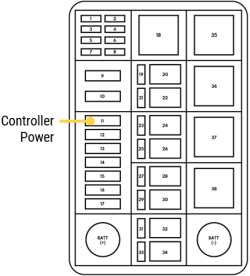 Ensure the controller power switch below the controller is turned on.