Generator Controller

Problem Items to Check, Troubleshooting Steps, Remedies

No power-up

Ensure the controller power switch below the controller is turned on.

Ensure the control power disconnect switch on the12 VDC distribution panel is turned on.

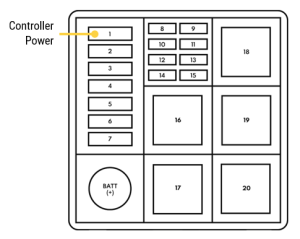
Check the fuse that provides power to the generator controller (Position 1) in the 12VDC distribution panel.

Verify that the battery connections are secure and that the battery voltage is 12VDC minimum.

Check the corresponding wire and terminal connections at the back of the fuse panel.

Check the battery power connections at the back of the generator controller, terminals 2 (Batt+). Verify that there is battery voltage measured on these terminals with respect to terminal 1 (Batt-).

Controller powers down shortly after turning the controller power switch on

The VPS1400A-T4 has a voltage monitoring and automatic shut off system to prevent the 12VDC system from being drained by parasitic loads when the generator is not running. When the monitoring system detects that the engine starting batteries have dropped in voltage, a relay is tripped to disconnect all non-essential loads. This includes removing power from the generator controller. By toggling the controller power switch off and then on, power will be supplied to the generator controller for a preset time duration. The engine must be started within this time frame or power will be switched off again.

The VPS1400A-T4 includes an optional solar-powered battery charger system that helps maintain the engine batteries at a full state of charge.